

Hello all. Here is a dial design I recreated, The Orpheus… I hope you like it? I want to show you briefly how I created and modelled it😊. I want to talk specifically, and briefly, about using ‘vertex groups’ in Blender for design purposes. Of course, you can use vertex groups or grouping for many things in design software, but for this post, I am going to discuss making a Guilloché fan pattern on a watch dial.
Firstly, what am I talking about when I refer to a Guilloché pattern? A Guilloché pattern is a decorative engraving technique that involves intricate and repetitive geometric patterns. It is commonly found on various items such as banknotes, jewelry, and watches, where it adds a sense of artistry and security. The process of creating a Guilloché pattern on a watch dial, for example, typically involves the use of a machine called a rose engine, which carefully guides the engraving tool to produce precise, symmetrical designs. These patterns are not only visually captivating but also serve as a deterrent against counterfeiting due to their complexity and difficulty to replicate. As a result, the Guilloché technique has been utilized for centuries to embellish and protect valuable items, showcasing the meticulous craftsmanship and attention to detail of the artisans who employ this sophisticated art form.
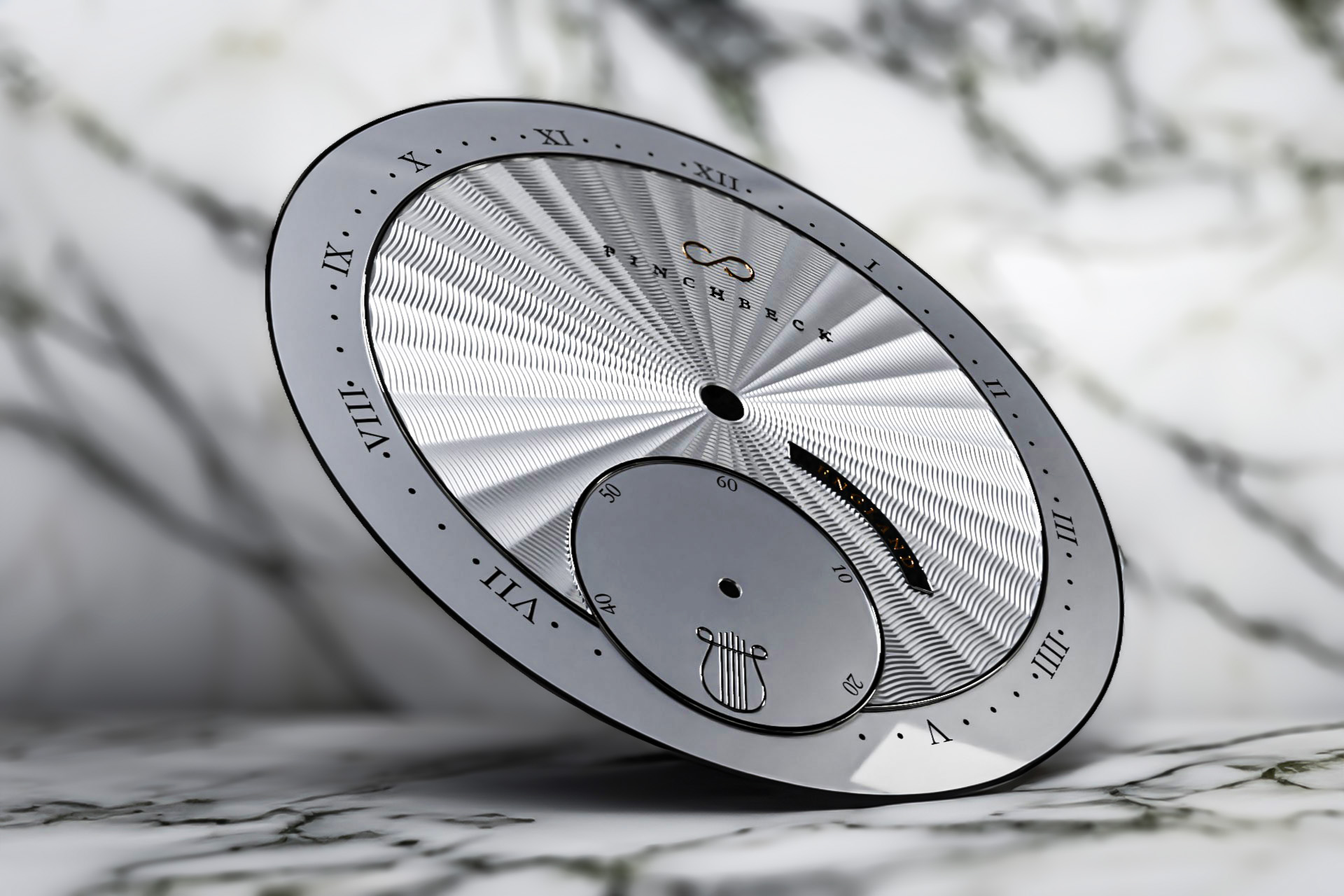
In this instance, for this post, we are looking at the Guilloché Fan pattern I created on this watch dial you see in the images at the top and below – the fanning engraved pattern:


These images are renders, they are not ‘real’ as you would say. I fully modelled and created them myself using Blender; a suite for 3D modeling, design, and animation etc. So what I want to specifically talk about is using a little trick called ‘vertex grouping’ in Blender, something not many people tend to know about or use. In Blender, vertex groups can be incredibly useful for a variety of tasks, such as rigging, particle systems, and weight painting. Understanding how to effectively use vertex groups can greatly enhance the quality and efficiency of your 3D modeling and animation projects. With vertex groups, you can control the influence of certain aspects of your model, such as deformations, texture painting, and object modifiers, giving you greater control and precision over your designs.
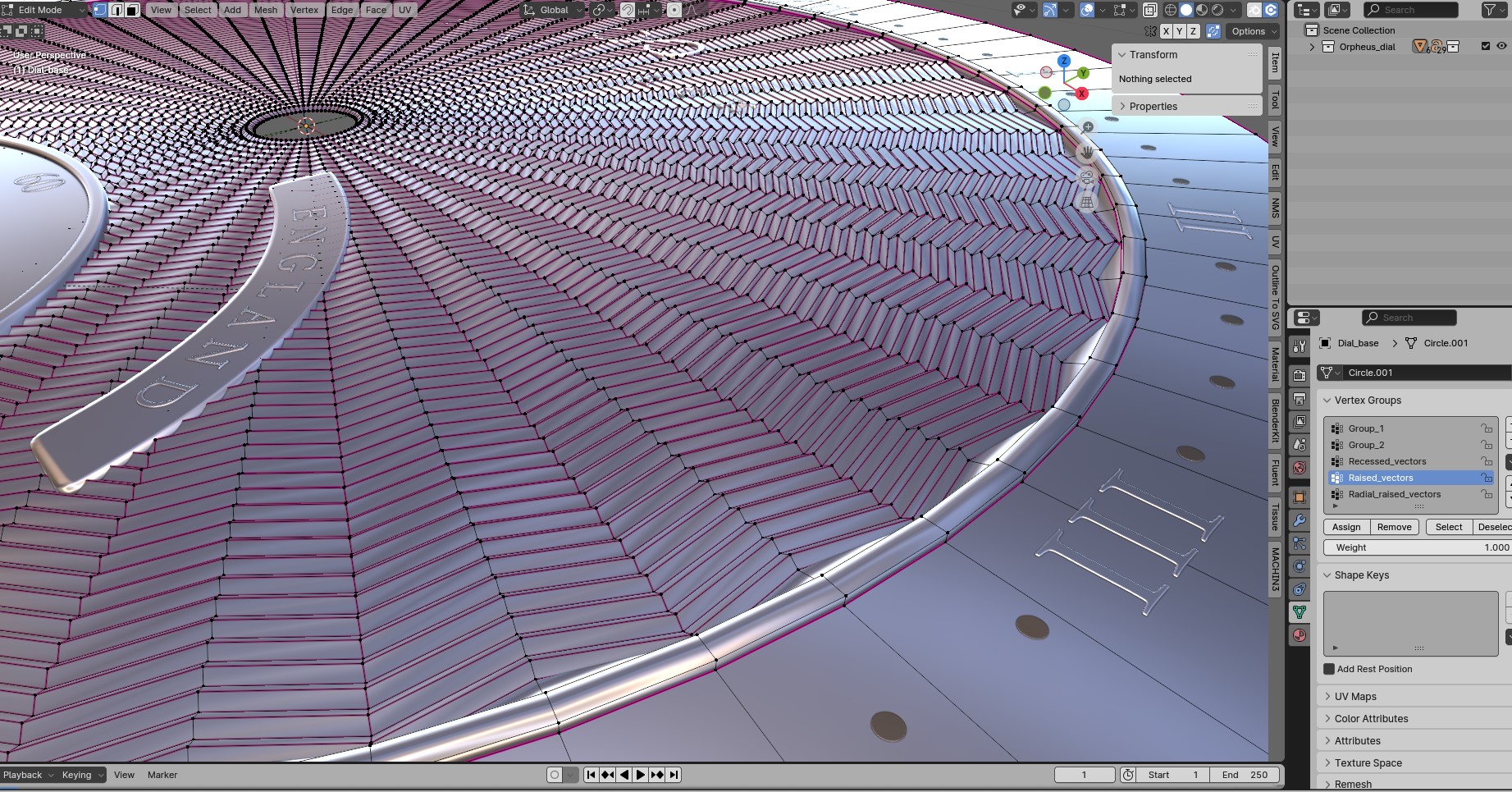
So in this post, I just want to show you how you can use vertex groups to easily and manually manipulate vertices to create fine and complex patterns, such as this Guilloché Fan pattern. Here is an image of the subdivided model of the watch dial I created. Essentially, I subdivided a circle with as many subdivisions as needed to start creating the fan pattern. Then, I grouped the individual vertices into three groups, or ‘vertex groups‘:
Recessed_vectors
Raised_vectors
Radial_raised_vectors.
I can manipulate these vertices together rather than individually to start to create the pattern and shape I am looking for.
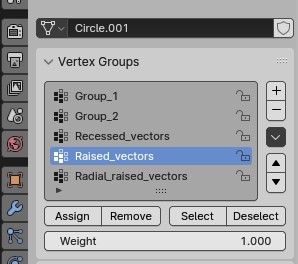
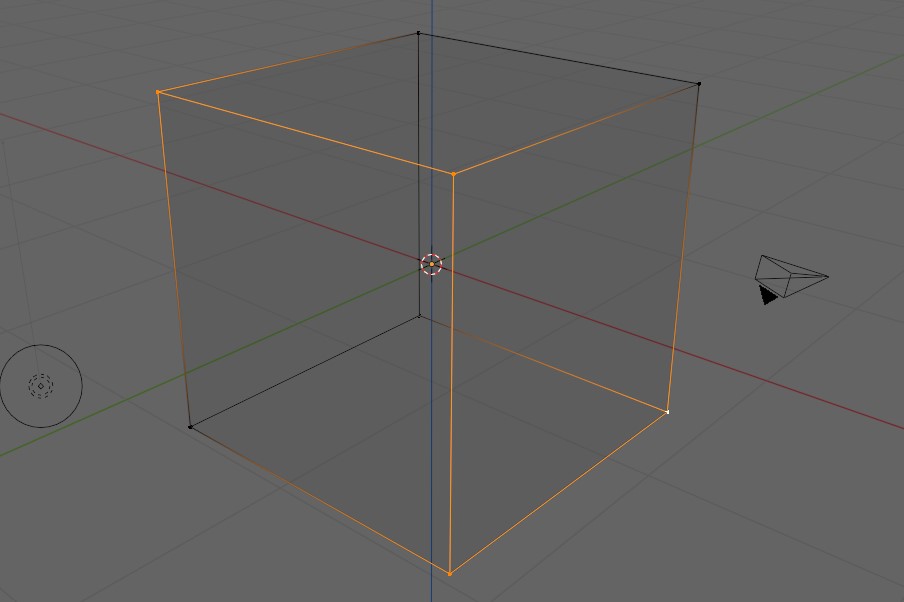
So, before I go into a brief explanation of how I have used these vector groups, I should probably first explain what a ‘vector’ in Blender actually is. A vector in Blender is a mathematical entity defined by both magnitude and direction, commonly used to represent points in 3D space. In Blender, vectors are instrumental in defining object locations, rotations, and scales, making them vital for accurate 3D modeling and animation. Understanding how to manipulate and utilize vectors is crucial for creating complex and dynamic visual effects in Blender. Below is an image I have captured of a cube with four of the vertices highlighted to help you see what I am referring to:
So back now to my dial model! Now to start with these subdivisions of vectors were ‘equal,’ and all I had was a disc of many concentric subdivided circles… So how do I turn this into this wonderful and beautiful Guilloché pattern? Well, having these three groups of divided vertices of these concentric circles means I can manipulate the groups individually to create the patterns:
So firstly, shown here in this image, we have the Recessed_vectors selected which I can grab and scale them Downward & In – to the centre:
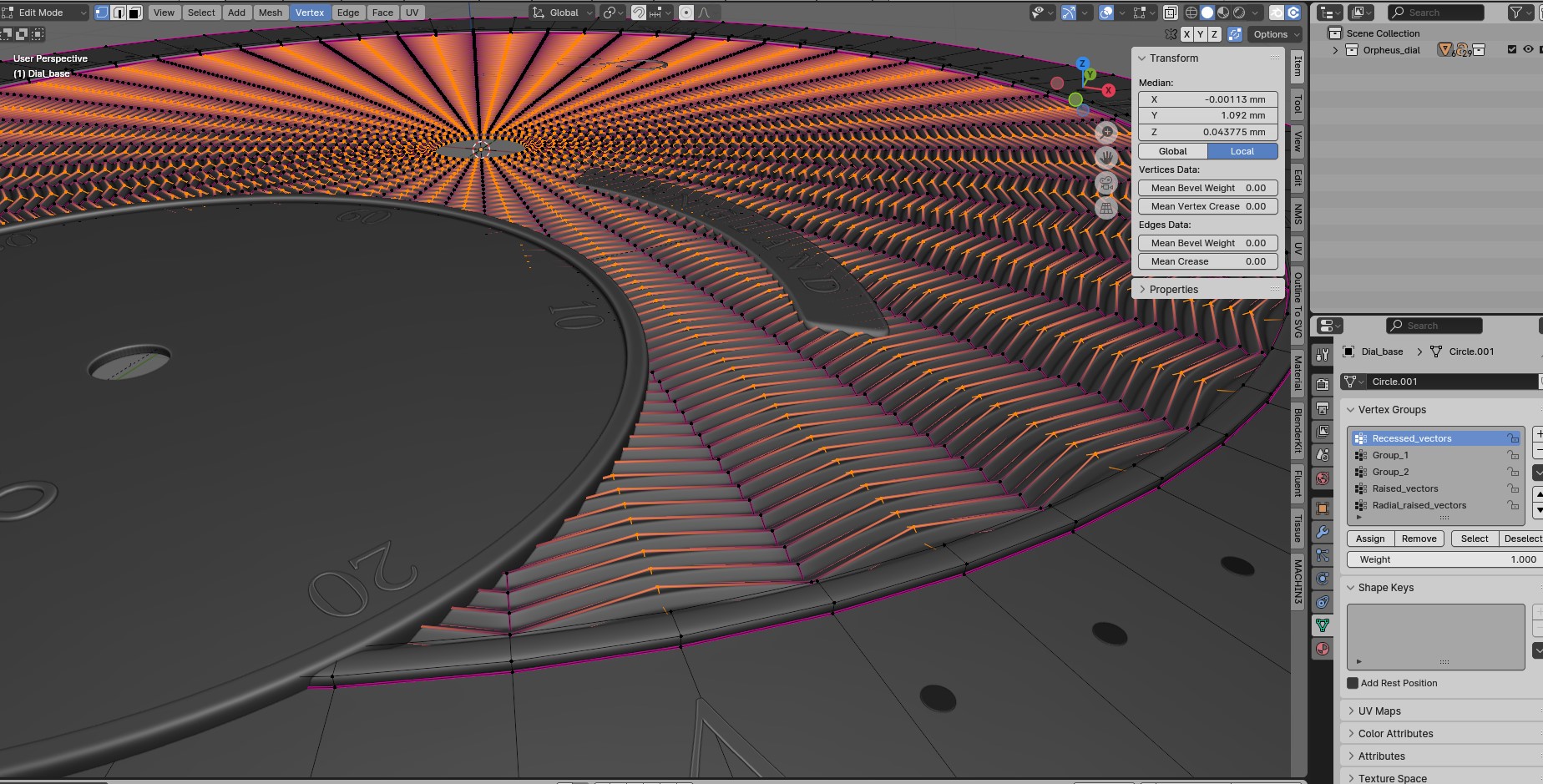
Grabbing these Recessed_vectors and pulling them inward and down means I create the base pattern of this fan pattern.
Then we have the Radial_raised_vectors, which are the separated vectors along the radial, meaning I can select these and pull them up or down together, creating the ribbed effect of the Guilloché fan pattern, as seen here in the image below:
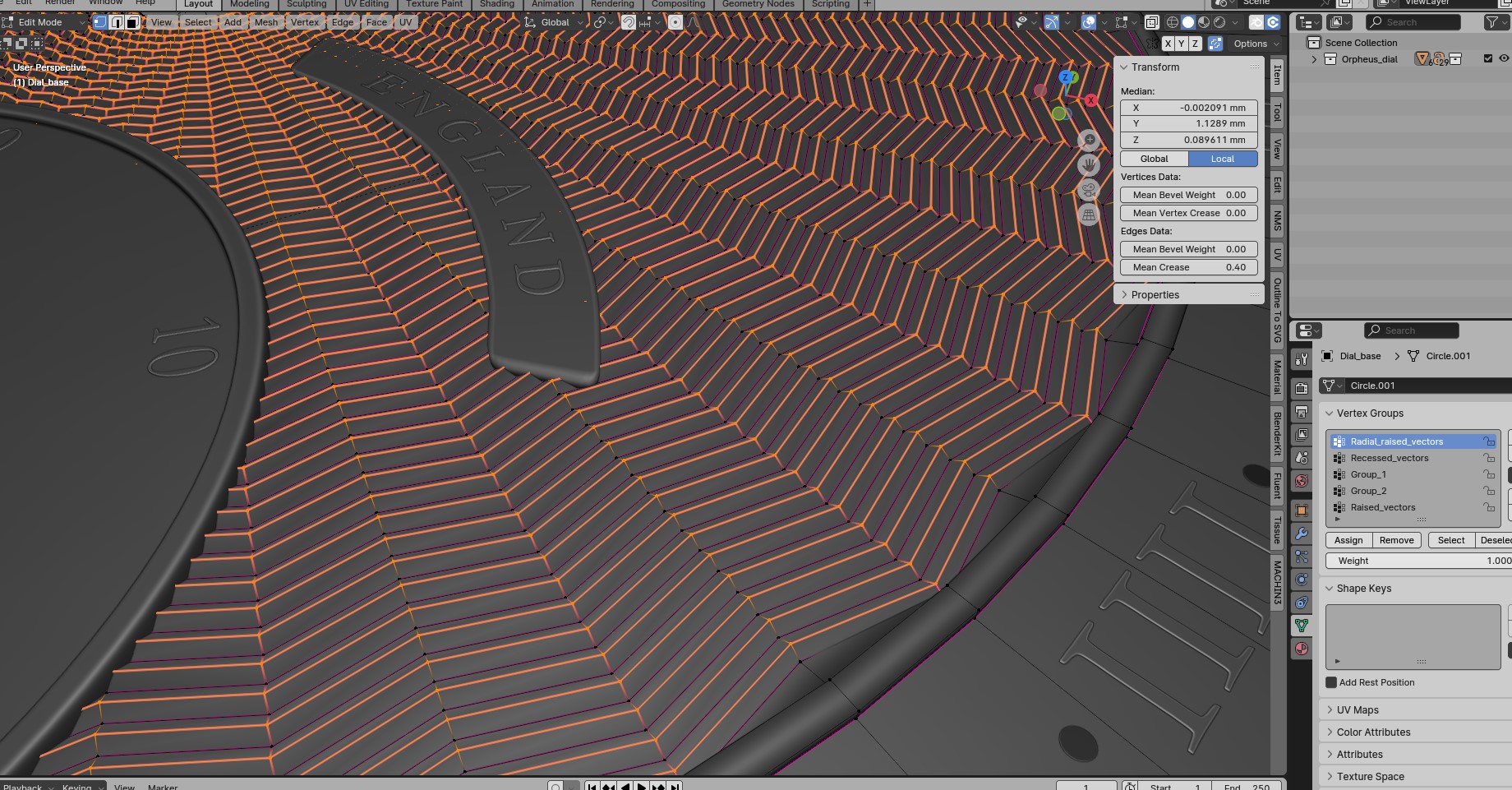
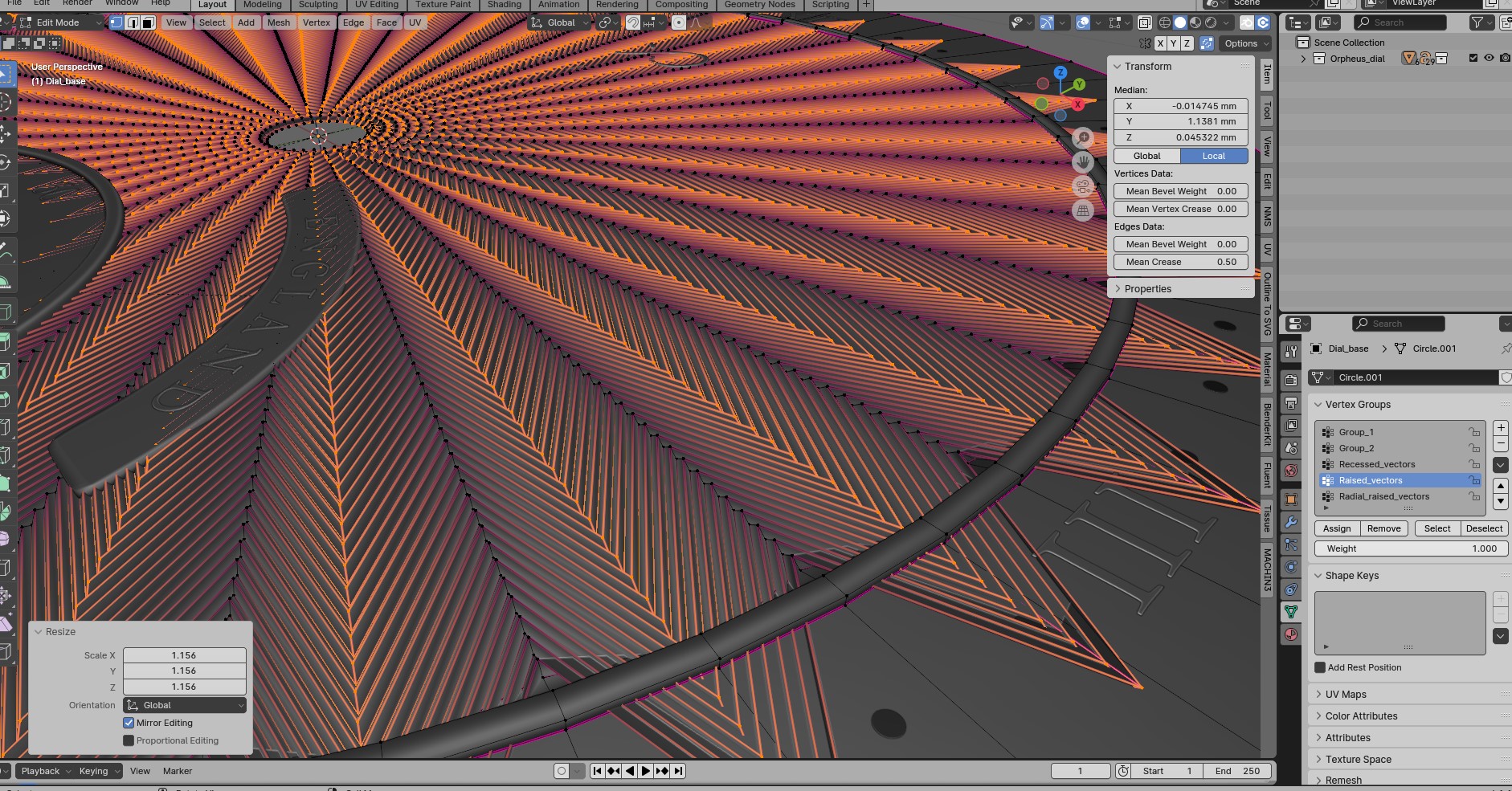
To exaggerate for emphasis and to help you understand this concept, below is an image where I have grabbed the Raised_vectors vector group, and then scaled them out drastically so you can see the effect. Hopefully, this helps you focus on the grabbed vectors and understand the concept.
A finished Render of The Watch Dial Model:
So there you have it, I hope from this brief explanation you have some concept of how this pattern was created in Blender partly by using vector groups. Of course this is just a very brief overview of this design and what vector groups can be used for. Vector groups in Blender or other 3d Software can be used in many ways and for varying purposes, such as controlling influence of modifiers, managing selection sets for easier editing, and creating complex textures or material effects. The versatility of vector groups allows for intricate and precise manipulation of elements within 3D designs, contributing to the creation of stunning visual effects and realistic renderings. These groups can also be utilized for animation control, enabling seamless and fluid movements of 3D models. Expanding your knowledge and skills in utilizing vector groups opens up endless possibilities for creativity in the realm of 3D design and animation.
I hope you enjoyed this post good people and you found it interesting and educational😊.
Have a great day everyone!
Kind regards, Jay

Discover more from Jayargonaut - Watch Designer
Subscribe to get the latest posts sent to your email.


Very pretty pattern. Nice to see more of the design process as well.
LikeLiked by 2 people
Thank you Margo🙏. I am glad you like it and appreciate the design process😊. Kind regards…Jay
LikeLiked by 1 person
I understood but I’d never be able to do the work myself. Thanks for explaining things.
LikeLiked by 3 people
Hi Leturos. You are very welcome👍.Though I am sure with your engineering background you understand all about vertices and such, and it brings that saying to mind; ”teaching Grandmother to suck eggs”. Glad you enjoyed the post my friend😊✌️.
LikeLiked by 2 people
Awesome, Jay! 👏👏 Really detailed and well-explained process, which shows how thorough you are with your work 😊 very admirable, for sure! 👍 Looks great, as well!
LikeLiked by 2 people
Thank you Laura for the very kind compliments😊. I am glad you enjoyed the post…and the design! Kind regards…Jay😊☕
LikeLiked by 2 people
Yeah, your work absolutely amazing Jay, keep up your creativity. All the best.
LikeLiked by 3 people
Thank you Freddie🙏. I sincerely appreciate your positive words and vibes!😊. Thank you my friend🙏…Jay✌️
LikeLiked by 2 people
My pleasure Jay.
LikeLiked by 1 person
A very mesmerizing design! And a fascinating explanation on the creation of it.
LikeLiked by 2 people
Thank you MagickMermaid😊. I am glad you like it.Thank you for your positive vibes…Jay😊
LikeLiked by 2 people
Very cool! and love seeing behind the scenes. Thanks for sharing 🙂
LikeLiked by 2 people
Thank you Kevin😊✌️, and you are welcome. I seriously appreciate the positive vibes and support. I am glad you liked it…Jay
LikeLiked by 1 person
Ive seen many Guilloche patterns but this is quite interesting.. such a creative one ✨ and the detailed explanation 🙌
LikeLiked by 2 people
Thank you very much for your kind words🙏. I am glad you like it and found it interesting. Kind regards…Jay😊
LikeLiked by 2 people
Very elegant dial, interesting design techniques!
LikeLiked by 3 people
Thank you my friend😊. I am glad you enjoyed the post, and I sincerely appreciate your kind words…Jay
LikeLiked by 1 person
Very impressive Jay!
LikeLiked by 3 people
Thank you Ajinkya😊. I am glad you enjoyed the post and appreciate your kind words…Best, Jay😊
LikeLiked by 3 people
Very impressive and beautifully explained
LikeLiked by 3 people
Thank you Namrata🙏. I am glad you like it and I sincerely appreciate your kind words…Jay😊
LikeLiked by 2 people
Impressive, Jay. ❤️
LikeLiked by 3 people
Thank you T for your kind comments😊. I sincerely appreciate them🙏…Jay
LikeLiked by 3 people
♥️❤️💖 amazing
Blessed and Happy afternoon 🌞 Greetings 🇪🇸
Pk 🌎 David López
LikeLiked by 2 people
Thank you David🙏. I am glad you like it and I appreciate your very kind words…Best, Jay😊
LikeLiked by 3 people
I hope visit my blog 🫂
Blessings 🌈
LikeLiked by 2 people
Most impressive design. Great they way you have taken viewers through the many processes. Literally awesome.
LikeLiked by 3 people
Thank you Vivienne😊🙏. I am glad you like & enjoyed it! I sincerely appreciate your very kind words and support…Jay😊
LikeLiked by 2 people
SALUTI
LikeLiked by 3 people
Grazie 🙏…Kind regards, Jay😊
LikeLiked by 3 people
grazie Yay………
Giovanni
LikeLiked by 1 person
So beautiful!
LikeLiked by 2 people
Thank you Dawn! I am glad you like it, and that you enjoyed the post😊. Kind regards…Jay
LikeLiked by 1 person
Wow Jay, you are very talented. Great design and animation stuff. You can make a great Production Designer for films and TV shows.
Keep it up💯💖✨
LikeLiked by 3 people
Thank you Mthobisi for that kind comment😊👍, I sincerely appreciate it! Creating a show is something I am considering for the future. Thank you, I will😊. Kind regards…Jay
LikeLiked by 1 person
My pleasure Jay🤘💖✨
LikeLiked by 2 people
Stunning design and such a detailed process.
LikeLiked by 1 person
Thank you Nilla😊. I am pleased you like the design, and enjoyed the post. Kind regards, Jay
LikeLiked by 1 person